
Download Id Props Sakura School – id props, sakura school, game enhancement, android app, free tool, visual appeal, props id, game customization, copy paste, gaming utility
Overview
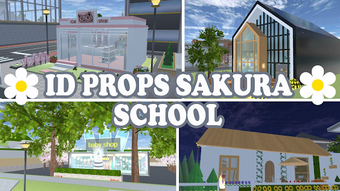
Id Props Sakura School is a free Android application developed by ZedagZedug, designed to enhance the visual experience within the Sakura SS game. The app serves as a utility tool for players seeking to customize and beautify their in-game environments by incorporating a wide range of pre-designed props. These include buildings such as ghost houses, waterparks, stations, sultan’s houses, BTS villas, and various vehicles like planes. The primary purpose of the app is to simplify the process of integrating these elements into gameplay through a straightforward copy-paste mechanism. By enabling users to quickly access and transfer prop IDs, the software reduces the time and effort required to locate and apply desired assets manually.
The target audience includes casual and dedicated gamers who enjoy creative customization in mobile games. It is particularly suited for players focused on aesthetic improvements, world-building, or community-driven content creation. The app functions as a reference and utility tool within the broader context of game modification and enhancement. Its use case is limited to the Sakura SS game, where players aim to elevate the visual appeal of their virtual spaces. The developer did not provide additional details about the app’s background or development philosophy.
Key Features & Capabilities
- Extensive Prop Library – Offers a diverse collection of in-game assets including buildings, vehicles, and points of interest such as waterparks, stations, ghost houses, and BTS villas.
- Copy-Paste Integration – Allows users to copy any desired prop ID directly from the app and paste it into the Sakura SS game for immediate use.
- Simple User Flow – Designed with minimal steps; users select a prop, copy its ID, and paste it into the game without requiring additional tools or complex configurations.
- Free Access – The app is available at no cost, making it accessible to a broad range of users interested in game customization.
- Focus on Visual Enhancement – Aims to improve the aesthetic quality of gameplay by introducing unique and visually appealing elements.
These features support real-world usage scenarios such as designing personalized game worlds, participating in community challenges, or showcasing creative builds. The app streamlines the process of acquiring and applying props, reducing the need for manual searching across forums or third-party sources. This efficiency helps users maintain focus on creativity rather than technical setup.
User Interface, Workflow & Performance
The user interface of Id Props Sakura School appears to be designed for simplicity and ease of navigation. Based on its functionality, the app likely features a clean layout with categorized lists or grids displaying available props. Users can browse through different types of assets, select one, and initiate the copy action with minimal interaction. The workflow is streamlined around the core task: copy an ID and paste it into the game.
Performance details were not specified by the developer. However, given the app’s size of 10.2 MB and its function as a lightweight utility, it is expected to operate smoothly on most modern Android devices. The developer did not provide information about resource usage, CPU or RAM behavior, or stability under prolonged use. General software behavior patterns suggest that the app remains responsive during standard operation. No data was provided regarding crash rates, background processes, or update frequency.
Compatibility & System Requirements
Id Props Sakura School is designed for Android devices. The app supports the Android operating system, though specific version requirements were not listed. The installation size is 10.2 MB, indicating a lightweight footprint suitable for devices with limited storage. The developer did not specify exact hardware requirements or minimum system specifications. Compatibility information was partially provided, leaving details about supported Android versions and device capabilities unclear.
Users should ensure their device runs a compatible version of Android. The app may not function on older or outdated systems without further testing. The developer did not mention whether the app is optimized for tablets, phones, or specific screen resolutions. General compatibility with standard Android smartphones is assumed, but no guarantees can be made without official documentation.
Pros and Cons
Pros
- Free to download and use
- Simple copy-paste functionality for quick integration
- Wide variety of visually appealing props available
- Lightweight at 10.2 MB
- Designed specifically for Sakura SS game customization
Cons
- Exact system requirements not specified
- No information on update frequency or developer support
- Limited to a single game (Sakura SS)
- Performance and stability details not provided
- Not available on other platforms such as iOS or PC
FAQ Section
Is Id Props Sakura School available for iOS devices?
The app is currently only available for Android. There is no official information about an iOS version.
Does the app require an internet connection to function?
The app does not require an active internet connection to access or copy prop IDs. However, an internet connection may be needed for updates or future features.
Is the app safe to download and use?
Id Props Sakura School is a free tool developed by ZedagZedug. It does not appear to include known malware or intrusive permissions. Users should download from trusted sources to ensure safety.
Can I use this app with games other than Sakura SS?
Based on available information, the app is designed exclusively for the Sakura SS game and may not be compatible with other titles.
How often is the app updated?
The developer did not provide details about update frequency. Users are advised to check the app store for the latest version.
Final Thoughts + CTA
Id Props Sakura School delivers a focused and practical solution for players seeking to enhance the visual appeal of their Sakura SS game environments. Its simple design, free access, and efficient copy-paste mechanism make it a valuable tool for creative gamers. While detailed performance and compatibility data are limited, the app’s lightweight nature and clear purpose suggest reliable functionality for its intended use.
It is best suited for users who prioritize aesthetics and customization in mobile gaming. Despite its narrow scope, it effectively fulfills its role as a gaming utility. For those looking to elevate their in-game worlds with unique props, this app offers a convenient and accessible path.
Download Id Props Sakura School now





.png)

